Wallet review
Ledger vs Trezor 2026 — which hardware wallet to pick?
In-depth comparison of the two leading hardware wallet makers — Secure Element grade, open-source philosophy and historical incidents.
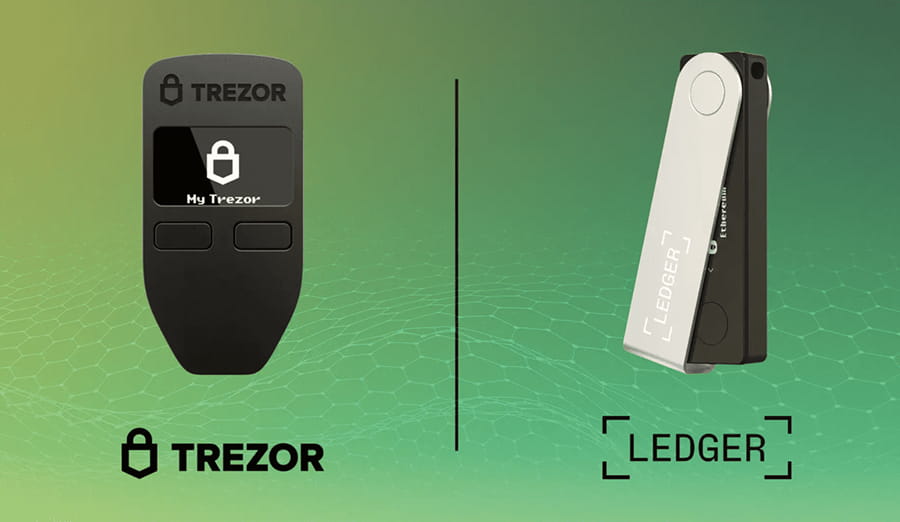
Ledger and Trezor are the two leading hardware wallet makers. Which is better for a Baltic or Nordic user in 2026? We compare Secure Element (EAL5+ vs EAL6+), firmware openness, security incidents, coin support and price — with a decision tree that walks you to the right pick.
TL;DR — which one to pick
| If your priority is... | Choose |
|---|---|
| Widest coin support (5,500+, including Solana, NFT) | Ledger Nano S Plus (€79) |
| Open-source firmware (verifiable independently) | Trezor Safe 3 (€79) |
| Mobile use over Bluetooth | Ledger Nano X (€149) |
| Touchscreen + CoinJoin for BTC privacy | Trezor Safe 5 (€169) |
| Highest EAL chip certification | Trezor (EAL6+) vs Ledger (EAL5+) |
| Cleanest corporate security record | Trezor (no public incidents) |
| €79 with BTC + ETH support | Tied |
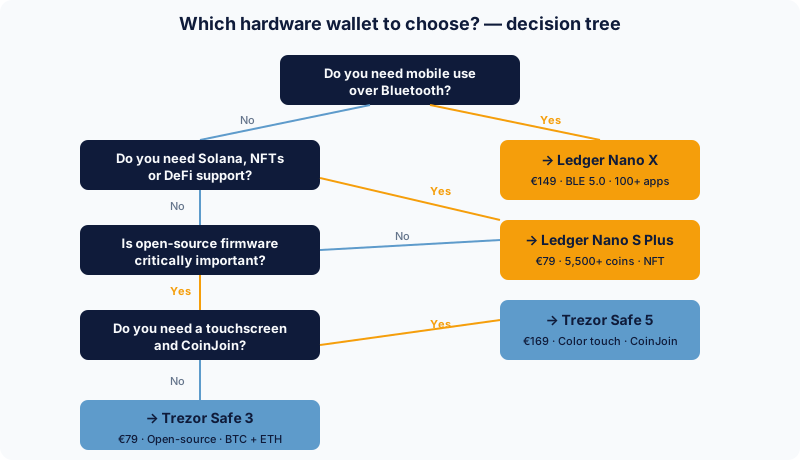
Our top pick for a Baltic beginner: If you mostly hold BTC + ETH and value openness — Trezor Safe 3. If you want wider coin coverage (Solana, NFT) — Ledger Nano S Plus.
Why this choice matters
A hardware wallet is a one-off investment that protects your crypto for years. The right choice depends on:
- How much you'll hold (€500 vs €50,000 — different security risk)
- Which blockchains you use (BTC only vs Bitcoin + Ethereum + Solana)
- How much you care about the trust model (closed vs open source)
- Whether you need mobility (Bluetooth) or a stationary USB connection
In this guide we compare both market leaders in 2026: Ledger (French company, founded 2014) and Trezor (Czech company, founded 2013, the original inventor of the hardware wallet).
To understand how a hardware wallet works in general, see step 5 of our Bitcoin buying guide.
How a hardware wallet actually works
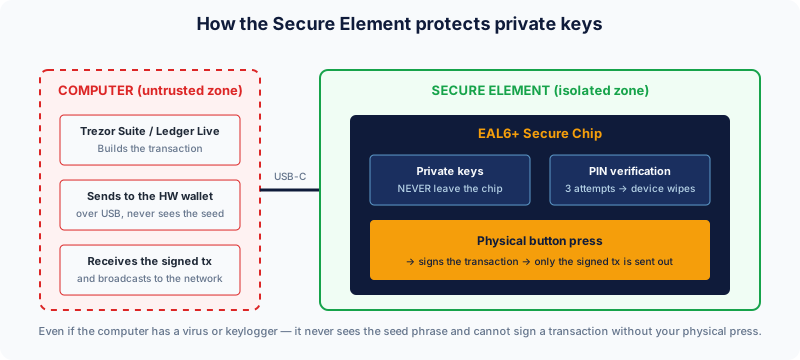
A hardware wallet solves one specific problem: you can't trust your computer. Even a clean Mac or Linux machine can be compromised by:
- Browser malware
- Phishing extensions
- A keylogger from a compromised USB stick
- A supply-chain attack (NPM package, browser plugin)
The hardware wallet solves this by placing your private keys in a physically isolated Secure Element chip that:
- Generates the keys and never releases them to the computer
- Requires a physical button press to sign a transaction
- Protects with a PIN (3 wrong attempts → the device wipes itself)
- Falls back to a 24-word seed phrase (BIP-39 standard) that you write on paper
Even if your computer has a virus, it can't see your seed phrase and can't sign a transaction without your click.
Detailed comparison
Security chip and certification
| Criterion | Ledger Nano S Plus | Trezor Safe 3 |
|---|---|---|
| Secure Element chip | ST31H320 (STMicroelectronics) | Optiga Trust M (Infineon) |
| EAL certification | EAL5+ | EAL6+ |
| PIN protection | ✓ (4–8 digits) | ✓ (1–50 digits) |
| Passphrase (25th word) | ✓ | ✓ |
| Tamper detection | ✓ | ✓ |
| Side-channel protection | ✓ | ✓ |
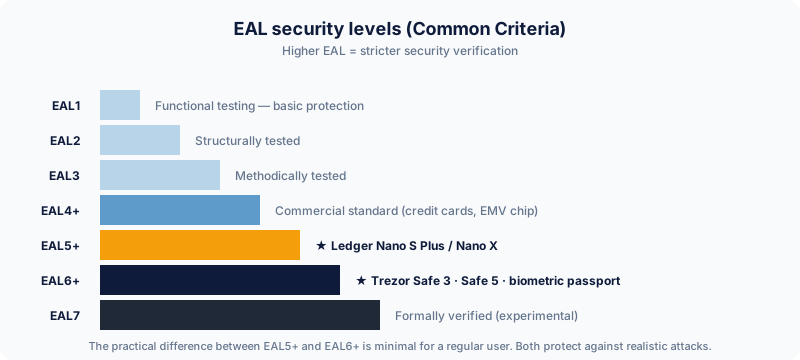
The EAL scale is a Common Criteria certification level where a higher number means stricter security verification:
- EAL4+ — commercial standard (credit cards, EMV chips)
- EAL5+ — high security (Ledger Nano S Plus / Nano X)
- EAL6+ — very high security (Trezor Safe 3, biometric passports)
- EAL7 — formally verified security (experimental)
In practice the difference is minimal for everyday users. Both are secure enough against realistic attacks. The gap only shows up in lab-grade physical attack scenarios (chip decapsulation with an electron microscope) — which doesn't apply to most individuals in real life.
Firmware philosophy — the main difference
This is the biggest philosophical difference between the two products:
Ledger: BOLOS firmware is partially closed. Most of it is public, but the critical security modules (Secure Element OS) aren't fully publicly auditable. Ledger's argument: "Closed code is exactly what protects the chip from open analysis — security through obscurity is part of the defence."
Trezor: Fully open-source. Every firmware component, hardware schematic and test procedure is readable on GitHub. Trezor's argument: "Independent verification is the only real security — if code is critically secure, it stays secure even in a public environment. Security through obscurity is a rejected principle."
| Approach | Pros | Cons |
|---|---|---|
| Closed (Ledger) | Side-channel protection, certification | You trust Ledger's engineers |
| Open (Trezor) | Anyone can audit | Larger public "attack surface" |
Either is right depending on your trust model. If you trust the Ledger engineering team and audit firms (Ledger has been audited by Quarkslab, ANSSI), BOLOS is fine. If you want a "verify, don't trust" approach — Trezor is the only choice.
Historical security incidents
Ledger:
- July 2020 — Ledger's e-commerce database was hacked. 270,000+ customer emails and shipping addresses publicly leaked. It didn't affect keys or funds directly, but it did:
- Many customers received sophisticated phishing
- Some customers were physically threatened (home break-in attempts)
- A reputation hit that's still raised in 2026 Reddit/Twitter discussions
- 2023 Recover feature — Ledger announced "Ledger Recover", which lets a user restore their seed phrase via third-party identification. Technically it requires a firmware update and user confirmation, but the community pushed back: "Ledger can get your seed phrase even without consent if you update firmware?" Ledger communicated openly that the option is opt-in, but trust was hit.
Trezor:
- No publicly known security incidents in the company's history that have affected users
- In 2017 a side-channel attack on the physical device with specialised equipment (lab grade) was disclosed and Trezor patched it quickly via firmware
- In 2024 a noticeable physical extraction attack on Trezor One and Model T was disclosed and patched, but it did NOT apply to Trezor Safe 3/5 (the new EAL6+ chip holds)
Our assessment: Trezor's reputation is cleaner, but Ledger's 2020 incident is more about operational security (e-commerce data handling) than wallet security directly. Practically — both are safe, but the psychological comfort differs.
Coin support
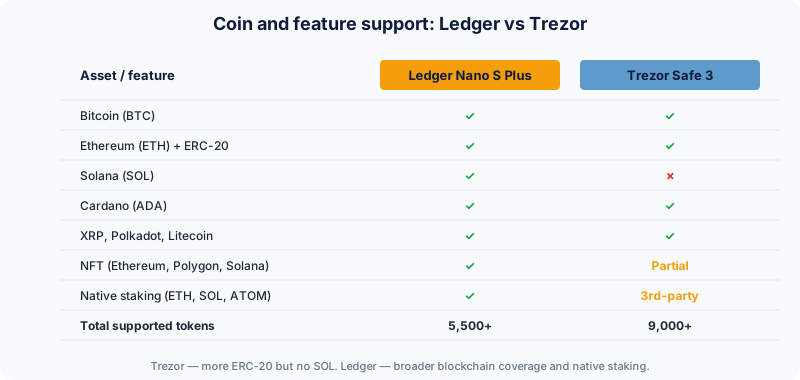
| Coin | Ledger Nano S Plus | Trezor Safe 3 |
|---|---|---|
| Bitcoin (BTC) | ✓ | ✓ |
| Ethereum (ETH) + ERC-20 | ✓ | ✓ |
| Solana (SOL) | ✓ | ✗ (not yet) |
| Cardano (ADA) | ✓ | ✓ |
| XRP | ✓ | ✓ |
| Polkadot (DOT) | ✓ | ✓ |
| Litecoin (LTC) | ✓ | ✓ |
| Monero (XMR) | ✓ (via 3rd-party) | ✓ |
| NFT (Ethereum, Polygon, Solana) | ✓ | Limited |
| Native staking | ETH, SOL, DOT, ADA, ATOM | Limited (mostly via 3rd-party) |
Number of supported coins:
- Ledger: 5,500+ (all major chains)
- Trezor: 9,000+ (bigger ERC-20 list, but no SOL)
If you hold any Solana-ecosystem token — Ledger is the only choice in this price tier.
User experience (UX)
Ledger Live (Ledger's official app):
- Polished UI, modern design
- Built-in DeFi integrations (Aave, Compound via partners)
- NFT support (Ethereum, Polygon, Solana) with an in-app NFT gallery
- Multi-chain portfolio view in EUR
- iOS + Android + macOS + Windows + Linux
- "Buy" and "Swap" functions directly inside the app (via partners)
Trezor Suite (Trezor's official app):
- Less polished UI, but functional and stable
- Native Tor support (one-click privacy)
- CoinJoin support (BTC privacy — Wasabi/Wabisabi-paired)
- Open-source — you can verify it yourself
- Web (suite.trezor.io) + macOS + Windows + Linux (no standalone iOS, Android via Trezor Suite Lite)
- Discreet mode — hides balances from people looking over your shoulder
Price and availability in the Baltics
| Model | Price | Shipping to the Baltics | In-person availability |
|---|---|---|---|
| Ledger Nano S Plus | €79 | €15, 5–10 days | No local reseller |
| Ledger Nano X | €149 | €15, 5–10 days | No local reseller |
| Trezor Safe 3 | €79 | €12, 5–7 days | No local reseller |
| Trezor Safe 5 | €169 | €12, 5–7 days | No local reseller |
Tip: Even when you buy from an official local reseller — check the packaging authenticity markers (Trezor — hologram, Ledger — tamper seal with holographic foil). Pre-loaded devices with compromised seed phrases are a real risk.
Deeper comparison — feature matrix
| Feature | Ledger Nano S Plus | Ledger Nano X | Trezor Safe 3 | Trezor Safe 5 |
|---|---|---|---|---|
| Price | €79 | €149 | €79 | €169 |
| Screen | 128×64 OLED | 128×64 OLED | 128×64 OLED | 1.54" colour touch |
| Bluetooth | ✗ | ✓ BLE 5.0 | ✗ | ✗ |
| USB | USB-C | USB-C | USB-C | USB-C |
| Built-in memory | 100+ apps | 100+ apps | Native | Native |
| Open-source | Partial | Partial | ✓ Fully | ✓ Fully |
| CoinJoin | ✗ | ✗ | ✓ | ✓ |
| Touch input | ✗ | ✗ | 2 buttons | Colour touch |
| Battery (mobile) | ✗ | ✓ 8h | ✗ | ✗ |
Our final recommendation
A first hardware wallet for a Baltic user:
→ Trezor Safe 3 (€79) if:
- You mostly hold BTC and ETH
- You value the open-source philosophy ("verify, don't trust")
- You're paranoid about Ledger's 2020 incident
- You want BTC privacy via CoinJoin
→ Ledger Nano S Plus (€79) if:
- You want the widest coin support (Solana, NFTs, DeFi)
- The Ledger Live ecosystem fits you
- You plan to actively stake ETH, SOL or DOT
→ Ledger Nano X (€149) if:
- You need mobile use over Bluetooth
- You're willing to pay 2× for wireless convenience
- You plan to hold 100+ different coins (Nano S Plus is 100 apps, Nano X — more)
→ Trezor Safe 5 (€169) if:
- You want premium UX with a colour touchscreen
- CoinJoin (BTC privacy) is a priority
- Open-source + EAL6+ is your ideal combo
Beginner's golden rule: Before you buy, read up on seed phrase storage. Even the best hardware wallet is useless if you lose the seed phrase. See step 5 of our Bitcoin buying guide.
Frequently asked questions
Do I need a hardware wallet if I only have €500 in BTC?
Recommendation — yes, although it's borderline. The hardware wallet's price (€79) is 16% of €500 — disproportionate protection. But — you learn the process in a safe environment, and the next €500 just stacks on top. If you really don't want to spend — see BlueWallet or Sparrow software wallet with full disk encryption.
Can I use one hardware wallet with several exchanges?
Yes. The hardware wallet is independent of exchanges. You can:
- Move BTC from Coinmotion to Ledger
- Move ETH from Bitpanda to the same Ledger
- Move SOL from Binance to the same Ledger
All addresses are derived from a single seed phrase.
How long does a hardware wallet last?
Mechanically — 5–10 years with normal use. If the device breaks (LCD, USB port) — you simply buy a new one and restore from the seed phrase. Private keys belong to the seed phrase, not the device.
Can I hold the same BTC on Ledger AND Trezor at the same time?
No — that would break Bitcoin's logic. But you can split your portfolio — e.g. 50% on Ledger, 50% on Trezor (different seeds). That reduces vendor trust risk and spreads risk.
What is Shamir Backup (SLIP-39)?
Trezor Safe 3 and Safe 5 support Shamir Backup — an alternative to the 24-word BIP-39 seed phrase. You create N shares (e.g. 5), of which M (e.g. 3) are required to restore. Useful if:
- You want to split the seed across family members (inheritance plan)
- You're paranoid about a single-location theft
Ledger doesn't support Shamir Backup but offers Ledger Recover (3rd-party seed split).
How do I tell a real Ledger/Trezor from a fake?
- Check the hologram (Trezor) or tamper seal (Ledger) on the packaging
- During setup the wallet generates the seed itself — if the box contains a "pre-printed seed", it's a compromised device. Don't use it, return it.
- Trezor Safe 3 offers a device authenticity check in Trezor Suite — it verifies the chip's signature
Which should a complete beginner pick?
For a complete Baltic beginner we recommend Trezor Safe 3 if you'll mainly hold BTC + ETH. It's a simple 2-button device, the documentation is excellent, and open-source means more public tutorials and community support.
Can I set a PIN on a hardware wallet?
Yes, mandatory. The first setup step is the PIN. Trezor allows 1–50 digits, Ledger — 4–8. 3 wrong attempts → the device wipes itself. So — write the PIN somewhere you'll find it (not next to the seed phrase).
Do I need a passphrase (25th word)?
It's an extra layer of security that you add on top of the 24-word seed. If someone finds your seed phrase (paper stolen) but doesn't have the passphrase — they get only a "decoy wallet" (or a completely different balance).
Our recommendation: use a passphrase if you hold > €10,000 in crypto. For smaller portfolios — make sure you've nailed seed-phrase hygiene first.
Related
- Ledger Nano S Plus review — full product review with pros/cons
- Trezor Safe 3 review — open-source HW wallet review
- BitBox02 — the Swiss alternative — third major choice
- All hardware wallets — full catalog with filters
- First Bitcoin purchase in Latvia — how to buy and transfer to HW
- How to declare crypto in Latvia — tax context for hardware users