How-to
Hardware Wallet Guide 2026 - Why You Need One
USB, Bluetooth and air-gapped wallet types, a comparison table for 19 models (Ledger, Trezor, BitBox, Coldcard, Foundation, NGRAVE, Tangem, Keystone, Blockstream Jade, etc.), and how to pick the right one
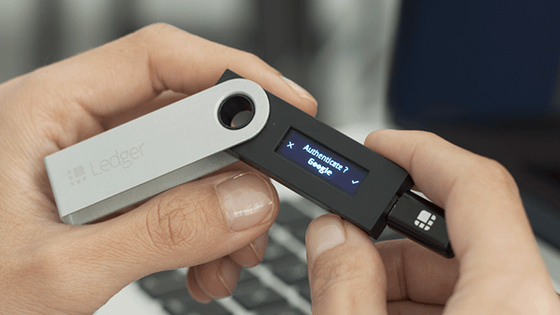
A hardware wallet holds your crypto private key in a secure chip, off the internet. This guide walks through the three main types — USB-cable, Bluetooth/mobile, and air-gapped QR/NFC — with concrete examples from the 19 models in our catalog: Ledger Nano S Plus (€53), Trezor Safe 3 (€59), Ledger Nano X (€109), Trezor Safe 5 (€129), BitBox02 (€149), Coldcard Q (€185), Foundation Passport (€240), NGRAVE ZERO (€398), Ledger Stax (€419) and more.
Why do you even need a hardware wallet?
Imagine your money isn't stored at your bank, but on your own phone. In this case, your phone acts as a bank vault. The security of your money depends on how well you can protect your phone from theft, viruses and your own mistakes.
This scenario describes exactly what it's like to be a cryptocurrency user. Your Bitcoin, Ethereum or USDC isn't "on account" at some central institution — it belongs to whoever holds the private key. If you store cryptocurrency on an exchange (Bitvavo, Kraken, Coinbase), then actually the exchange holds the private key. You're relying on the exchange not going bankrupt, not getting hacked, and regulators not freezing your account. Most of the time this works fine, but history shows that unpleasant surprises can happen. A hardware wallet solves exactly this problem — you hold your own private key, and it's protected by a physical chip on the device that can't be accessed over the internet.
It's like a home safe — internet hackers won't be able to touch your Bitcoin. To steal Bitcoin from a Ledger or Trezor, someone would need to find the actual device, know your 6+ digit PIN and approve the transaction in your presence. If the device gets lost, you still have your 24-word recovery phrase (seed phrase), which you've memorised or written down on paper, and you can restore access using another wallet.
Three main types of hardware wallet
The market has three main categories that differ in how the device communicates with the outside world.
1. USB cable wallets (classic)
These wallets plug into your computer with a USB-C cable. Simple, fast and cheap. You plug in the device, enter your PIN on its screen, approve the transaction — and you're done.
Examples: Ledger Nano S Plus, Trezor Safe 3, BitBox02.
Pros: Cheapest (€47–149), reliable, tested over the years.
Cons: Can't use directly with your phone (you need a cable and USB-C port), no built-in battery.
2. Bluetooth/mobile devices
These wallets connect wirelessly to your phone using Bluetooth. You can carry them freely in your pocket, they have a rechargeable battery, and the screen is usually colourful and touch-sensitive.
Examples: Ledger Nano X (€109), Ledger Flex (€259), Ledger Stax (€419).
Pros: Mobility, larger screen, modern UX.
Cons: More expensive, one more potential attack surface (although there's no publicly recorded case of a private key being stolen via Bluetooth).
3. Air-gapped (QR/NFC) wallets
These wallets never connect to a computer or the internet. Communication happens only through QR codes, NFC taps or microSD cards. Only the signed transaction reaches your computer, whilst the private key never leaves the wallet itself.
Examples: Blockstream Jade (€69), Coldcard Q (€185), Foundation Passport (€240), Keystone 3 Pro (€120), NGRAVE ZERO (€398), Ellipal Titan 2 (€160), SafePal S1 (€47).
Pros: Provides the best theoretical protection against remote attacks, very suitable for long-term storage of large amounts.
Cons: Slower everyday user experience (UX) (every transaction requires scanning a QR code), usually more expensive than USB wallets.
Special example: Tangem Wallet (€55) — a bank card-shaped NFC device that's simpler than regular wallets (no seed phrase needed if you choose the version without one), but with a different security profile.
Bitcoin-only vs multi-coin wallets
Many manufacturers offer two models: one designed for Bitcoin only, and another that supports multiple cryptocurrencies (multi-coin) (Bitcoin + Ethereum + 1000+ tokens).
Bitcoin-only versions (Trezor Safe 5 Bitcoin-only, BitBox02 Bitcoin-only, Coldcard Mk4) advantages:
- Smaller firmware — less code means fewer potential security vulnerabilities.
- Focus on security — all the manufacturer's engineering resources are concentrated on one goal.
- No possibility of accidentally signing malicious Ethereum or DeFi transactions.
Multi-coin versions (Ledger family, Trezor Safe 5, BitBox02 Multi, Keystone) advantages:
- You can decide later — it doesn't limit your future options.
- One wallet for all cryptocurrencies (BTC, ETH, SOL, stablecoins).
- DeFi, NFTs, staking — everything is available.
Comparison Table: Which Wallet Suits Which User
| User Profile | Best Wallet | Price | Why |
|---|---|---|---|
| First wallet, small investments (up to €1000) | Ledger Nano S Plus or Trezor Safe 3 | 53–59€ | Cheapest from trusted brands; everything a beginner needs |
| Mobile user with frequent purchases | Ledger Nano X | 109€ | Bluetooth connection to phone, compact, battery-powered |
| "Hardcore HODLer" — Bitcoin only, long-term | Trezor Safe 5 Bitcoin-only or Coldcard Q | 129–185€ | Bitcoin-only firmware reduces attack surface |
| Multi-crypto enthusiast (BTC + ETH + DeFi) | Ledger Flex or Trezor Safe 5 | 129–259€ | Broad token support, colour screen, user-friendly interface (UX) |
| Maximum security, large assets (€100k+) | Coldcard Q, or |
Specific Risks That Hardware Wallets Prevent
Without a wallet, you're exposed to these risks. A hardware wallet prevents every single one.
| Risk | Without Hardware Wallet | With Hardware Wallet |
|---|---|---|
| Computer hack (malware, keyloggers) | Your access credentials are stolen | Prevented: your private key never sits on your computer |
| Phishing websites | You accidentally sign a malicious transaction | Prevented: you approve transactions physically on the wallet screen |
| Exchange hack (Mt. Gox, FTX, Bitfinex) | You lose everything held on the exchange | Prevented: your funds aren't on the exchange |
| Exchange bankruptcy or regulatory action | Your account is frozen or lost | Prevented: you hold your own keys |
| SIM swap and 2FA bypass | A hacker takes over your account | Prevented: requires a physical device, not just SMS |
| Phone theft | Your hot wallet app is compromised | Prevented: hardware wallet is a separate physical device |
| Your own mistake — careless transaction | Funds can be sent to the wrong address | Partially prevented: wallet displays recipient address on its own screen |
How to Use a Hardware Wallet in Practice — 6 Steps
-
Buy the device from an official manufacturer or authorised partner. NEVER buy from untrusted third parties (eBay, Facebook Marketplace) — the device may be pre-compromised.
-
Unbox and check the seal — all new wallets arrive properly sealed. If the seal is broken or the device is already "set up" — return it.
-
Set a PIN code on the device itself (4–8 digits depending on the model). NEVER enter your PIN on a computer or phone — only use the device's physical buttons or touchscreen.
-
Write down your 24-word seed phrase on paper (or better yet, on a metal plate that won't burn). Never save it on your phone, cloud, email, or any digital location.
-
Test seed phrase recovery on a spare wallet — if you choose, you can immediately verify that your written seed phrase actually works. (Move to another wallet or do a factory reset and restore.)
-
Transfer crypto from an exchange to your address (start with a small amount first!) — always do your first transaction with a tiny sum (5–20€) to confirm the address is correct and everything works.
Common Mistakes to Avoid
- Photographing your seed phrase — big mistake. Your phone can be stolen, cloud can leak.
- Buying via Facebook Marketplace or from individuals — the wallet is likely already compromised.
- Saving your PIN in a password manager — undermines the entire security concept.
- Keeping one large sum on a single wallet — spread across 2–3 wallets if you have substantial assets.
- Outdated firmware — manufacturers regularly release security updates. Check at least every 6 months.
Answer to a Frequently Asked Question — What Happens If Your Wallet Goes Missing or Breaks?
This is the core security principle of hardware wallets: your money isn't in the wallet. The wallet is just a key to the blockchain. The actual record of how much Bitcoin you own lives on the Bitcoin blockchain across thousands of computers worldwide. The wallet only stores the private key that lets you sign transactions.
If your wallet goes missing, breaks, or you forget the PIN — you only need your seed phrase (24 words). Buy a new wallet (it can be from a different manufacturer), enter those same 24 words, and your money reappears. The seed phrase is a backup of the actual funds, not just a wallet accessory.
That's why the physical security of your seed phrase is critical — it's the only thing that doesn't break, doesn't get lost, and never gets sent to any server.
Price and Choice Summary
- Beginner with a small portfolio (€100–1000): Ledger Nano S Plus (53€) or Trezor Safe 3 (59€). Simple and secure investment that pays for itself within a year.
- Active multi-coin user: Ledger Flex (259€) or Trezor Safe 5 (129€). The touchscreen colour display makes everyday use a pleasure.
- Bitcoin purist HODLer with large assets: Coldcard Q (185€) or Foundation Passport (240€) — air-gapped, BTC-only firmware, prioritising security.
- "I hold everything in everything" portfolio: Ledger Stax (419€) or NGRAVE ZERO (398€) — premium choices with elite-level security.
A full list with detailed reviews can be found in our hardware wallet catalogue.
Summary
A hardware wallet is the single best thing you can do for your security in today's crypto world. There's no need to expose yourself to exchange hacks or viruses on your own computer — for roughly €50–200 you get a level of security that would cost thousands of pounds in the traditional finance world.
The bottom line: if your crypto assets are worth more than €500–1000 and you're planning to hold them for longer than a few months — a hardware wallet isn't a luxury, it's a necessity.
Start simple — pick one from the options above (Ledger Nano S Plus or Trezor Safe 3 are a brilliant starting point), spend 30 minutes setting up the device and writing down your seed phrase, and you'll be practically bulletproof against the kinds of disasters that have stolen billions of pounds from crypto users so far.
Related Reading
- Complete hardware wallet catalogue
- How to Make Your First Bitcoin Purchase in the UK in 2026
- What is a Stablecoin? Complete Guide for 2026
- FCA-Regulated Exchanges in the UK and Europe
Sources
- Yellow.com — Air-Gapped vs USB vs Bluetooth Hardware Wallets
- Coin Bureau — Best Crypto Hardware Wallets of 2026
- Coinbase Learn — What is an air-gapped wallet?
- CoinLedger — 9 Best Cold Storage Wallets 2026
- Keystone — Why Air Gap Hardware Wallets Offer Superior Security
- Ledger Academy — Ledger vs Trezor 2026
- The Crypto Merchant — Hardware Wallet Recovery Seeds Explained